
Terrain Heightmap Generator
Generate a random terrain heightmap with mountains, valleys and erosion gullies, and download it as 16-bit PNG or RAW.
Free · runs in your browser · nothing is uploaded
Recent
Your last 10 settings, saved only in this browser. Nothing is uploaded.
A terrain heightmap generator creates a random landscape as a grey 16-bit image: dark valleys, light peaks and everything in between, ready to import into a terrain system or to displace a plane. This one builds the shape from fractal simplex noise, mixes in sharp ridges, deepens the valleys with an exponent and then runs a simulation of rain droplets that pick up and drop sediment, carving gullies and filling basins the way water does. It writes the result at the 2ⁿ + 1 sizes Unity expects (257, 513, 1025 or 2049), at the recommended Unreal Engine landscape sizes (127, 253, 505, 1009, 2017 or 4033) or at plain powers of two, as a 16-bit PNG and as a headerless 16-bit RAW file, together with a coloured preview. A seed makes every landscape repeatable.
Use it for game prototypes, level blockouts and displacement tests.
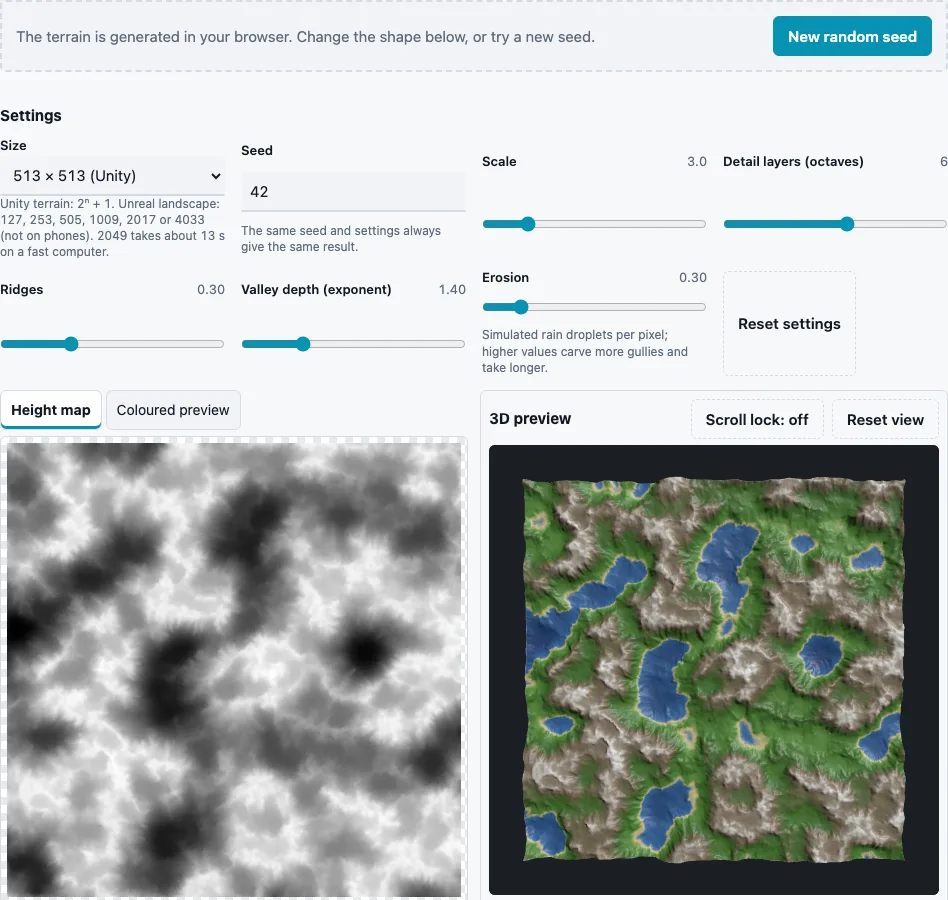
How to use the Terrain Heightmap Generator
- Open the page: a terrain is generated straight away, with nothing to upload.
- Choose a Size: for Unity 257, 513 (default), 1025 or 2049; for Unreal 127, 253, 505, 1009, 2017 or 4033; or 256, 512, 1024 or 2048. Each option says which engine it is for.
- Set Scale (1 to 12, default 3): how many large landforms fit across the map. Low values give one big mountain range, high values many small hills.
- Set Detail layers (octaves) (1 to 10, default 6) for the amount of fine detail on the slopes.
- Set Ridges (0 to 1, default 0.3) to mix in sharp, mountain-like crests.
- Set Valley depth (exponent) (0.5 to 4, default 1.4). Values above 1 flatten the lowlands and steepen the peaks.
- Set Erosion (0 to 2, default 0.3), the number of simulated rain droplets per pixel. Higher values carve deeper gullies and take longer.
- Try New random seed or type a Seed (1 to 99999, default 42) for another landscape with the same character.
- Check the displaced plane in the 3D preview, then press Download Height map, Download RAW (16-bit), Download Coloured preview or Download all (ZIP).
The coloured preview is only for looking at; use the height map or the RAW file in your engine. Large sizes take time: at the default erosion 2049 × 2049 (about 1.26 million droplets) took 13 s and 4033 × 4033 16 to 20 s on a fast desktop computer, and the highest erosion one to two minutes; phones are slower, so 4033 is not offered on phones. Sizes above 2049 keep that droplet budget, so their erosion is lighter. The settings and seed are kept in the page address, so a saved link rebuilds the same terrain.
Which heightmap size does my terrain engine need?
Check your engine’s terrain documentation; many terrain systems want a power of two plus one. Unity’s manual says the terrain’s heightmap resolution “must be a power of two plus one, for example, 513”, and Unity imports heightmaps as RAW files with a choice of 8 or 16 bit, byte order and vertical flip. That is why the 2ⁿ + 1 sizes are offered first.
| Size | 16-bit RAW file size | Droplets at Erosion 0.3 |
|---|---|---|
| 257 × 257 | 132,098 bytes | 19,815 |
| 513 × 513 | 526,338 bytes | 78,951 |
| 1025 × 1025 | 2,101,250 bytes | 315,188 |
| 2049 × 2049 | 8,396,802 bytes | 1,259,520 |
The RAW file has no header: just 2 bytes per height, little-endian, written row by row from the top. Its size is width × height × 2, so the resolution of a square file can be worked out from its size alone.
Why 513 instead of 512?
A terrain grid of 512 × 512 squares has 513 × 513 corner points, and a heightmap stores one height per corner. The extra row and column also let neighbouring terrain tiles share their edge heights exactly.
How does the erosion work?
Each droplet starts at a random point, rolls downhill along the slope with some inertia, speeds up as it descends and carries more sediment the faster it moves. It deposits sediment when it slows or climbs and erodes the ground when it can carry more, and slowly evaporates. Thousands of droplets together cut channels into slopes and fill hollows. After erosion the heights are stretched to the full 0 to 1 range again.
How do the shape controls interact?
Scale and octaves set the size of the features: scale places the big landforms, and each extra octave adds a layer of detail at twice the frequency and half the strength of the one before. Ridges replaces part of that rounded noise with folded noise, which produces knife-edge crests. The exponent then reshapes the whole height range after it has been stretched to 0 to 1: at 1.4 a point halfway up drops to about 0.38, so lowlands spread out and peaks become steeper. Erosion comes last and works on that shape, which is why the same erosion value looks stronger on steep, ridged terrain than on soft hills.
Questions and answers
Can I import the heightmap into Unity or Unreal Engine?
Use the RAW file or the 16-bit PNG, whichever your terrain importer accepts. For Unity, pick a 2ⁿ + 1 size, 16 bit and little-endian byte order (Windows) in the import dialog. For Unreal, pick one of the Unreal sizes, which are the recommended landscape sizes in Epic’s Landscape Technical Guide and fit its component layout.
Can I make a heightmap of a real place?
No. The terrain is generated from noise and simulated erosion; it does not use elevation data of any real location.
What does erosion do?
It simulates rain carving the land: gullies on slopes, smoother valley floors and sediment fans. 0 turns it off for pure noise terrain.
Is the terrain tileable?
No. The edges do not continue into each other, so tiles side by side show steps at the borders.
Will I get the same terrain with the same settings?
Yes. The same size, settings and seed always give the same heights.
How do I set the real height in metres?
The file holds 0 to 1 only. Set the terrain height in your engine; white becomes that maximum height and black the base.
Why does the heightmap look flat in my engine?
The terrain height setting in the engine is too low, or the file was imported as 8-bit. Use the 16-bit file and raise the terrain height.
Can I paint or edit the result?
Yes. Open the 16-bit PNG in an image editor that keeps 16 bits per channel, then convert it to RAW on the RAW Heightmap to PNG Converter if your engine wants RAW.
Related tools
- RAW Heightmap to PNG Converter: open or create RAW heightmaps.
- Height Map Generator: height from a photo or texture instead.
- Height Map to Normal Map: a normal map of the terrain.
- Displacement Map Generator: set a midpoint for displacement.
- Normal Map to Height Map: height from an existing normal map.
- Ambient Occlusion Map Generator: shade the valleys and gullies.