
Seamless Texture Generator
Generate a texture that tiles perfectly, from noise or a pattern, with a height map and normal map to match.
Free · runs in your browser · nothing is uploaded
Recent
Your last 10 settings, saved only in this browser. Nothing is uploaded.
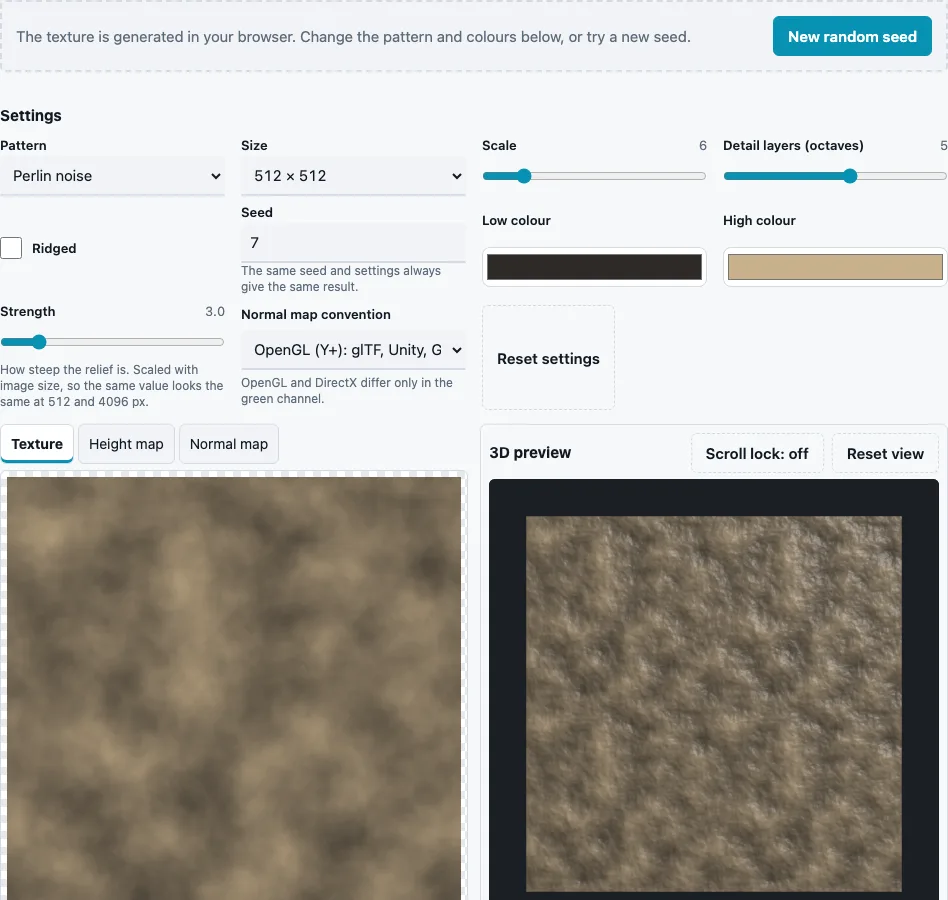
How to use the Seamless Texture Generator
- Pick a Pattern. The texture appears straight away; there is nothing to upload.
- Choose a Size: 256, 512 (default), 1024 or 2048 px square.
- Set Scale (1 to 32, default 6): how many cells, bricks or noise features fit across the tile.
- For the noise patterns, set Detail layers (octaves) (1 to 8, default 5) and tick Ridged for sharp crests. For bricks, tiles, hexagons and cracked stone, set Joint width (0.02 to 0.3, default 0.08). For the geometric patterns, Surface grain (0 to 1, default 0.25) adds noise to their faces.
- Change Seed (1 to 99999, default 7) or press New random seed for another variation of the same pattern.
- Pick Low colour (default #2e2a26) and High colour (default #c8b08a); the height is coloured from one to the other.
- Set Strength (default 3) and the Normal map convention for the normal map.
- Tick Show 2 × 2 tiled to check the join, then press Download Texture, Download Height map, Download Normal map or Download all (ZIP).
Sizes of 1024 px and above take a few seconds (up to about 10 s at 2048 px on a desktop), since every pixel samples several noise layers. The settings, seed included, are kept in the page address, so the link to a texture you like brings back exactly that texture. The 3D preview shows the material on a plane repeated 2 × 2 by default.
How do procedural textures tile without seams?
Every pattern here is defined on a grid that repeats exactly once across the tile. Noise uses a whole number of cells across the width at every octave, simplex noise is sampled on a loop in four dimensions, and bricks, tiles and hexagons are laid out in whole rows and columns. Because the maths itself wraps around, the last column of pixels leads straight into the first.
The result can be measured. The seam ratio divides the average step between pixels that touch across the wrap edge by the average step between ordinary neighbours; 1 means the edge is indistinguishable from any other pixel step. When the same edge line already appears inside a repeating pattern, such as a checker border, that line is the yardstick instead, so a perfect repeat still scores 1. The default texture scores 0.92. By comparison, the brick photo crop used as the sample on the Make Texture Seamless page scores 17.95 before blending.
| Pattern group | Controls | Typical use |
|---|---|---|
| Perlin, simplex, value noise | scale, octaves, ridged | dirt, clouds, terrain detail, grunge masks |
| Cells (Worley) | scale, octaves, ridged | scales, cells, stone grain |
| Bricks, tiles, hexagons | scale, joint width, surface grain | walls, floors, panels |
| Cracked stone | scale, joint width, surface grain | dry ground, flagstones |
| Checker, stripes | scale, surface grain | test patterns, fabrics |
What is a seamless texture?
A seamless texture is an image whose opposite edges match, so copies placed side by side join without a visible line. Seamless and tileable mean the same thing. The edge can be made to match in two ways: by generating the pattern on a repeating grid, as this page does, or by blending the edges of a photo, as the Make Texture Seamless page does.
Why does a tiling texture still look repetitive?
A missing seam does not hide repetition. A distinctive feature repeated in a grid draws the eye, so prefer more cells (a higher Scale) on large surfaces, or break up the grid in your engine with decals or a second texture at a different scale.
Octaves add finer copies of the noise on top of each other, each with twice the frequency and half the strength of the one before, which is what turns smooth blobs into natural-looking detail. Ridged folds every layer into sharp crests, useful for rock or veined patterns.
Questions and answers
What is the difference between seamless and tileable?
None in practice; both describe a texture whose edges join invisibly when it repeats.
Can I use the textures in games and 3D scenes?
Yes. Import the texture as colour, and the height and normal maps as data with sRGB off.
Can I use the result commercially?
Yes. The site terms say what you generate is yours to use, including commercially.
Which sizes and formats are available?
256 to 2048 px square, saved as PNG (8 or 16-bit) or 8-bit TGA. The height map is 16-bit by default.
Can a chatbot generate seamless textures?
This page does not use AI or text prompts: it generates patterns from settings and a seed, so results are exact and repeatable.
Can I make a photo seamless instead?
Yes, on the Make Texture Seamless page, which blends the edges of your own image.
Will I get the same texture again later?
Yes. The same pattern, size, settings and seed always give exactly the same pixels, so you can note the seed or keep the page link and rebuild the texture at another size.
How do I get more than two colours?
The colour runs between the two you pick. For richer colour, download the 16-bit height map and apply a gradient map in an image editor or shader.
Related tools
- Make Texture Seamless: blend the edges of a photo instead.
- Tileable Texture Tester: measure the seam of any texture.
- Seamless Normal Map Generator: tileable normals from a photo.
- PBR Texture Generator: roughness and AO from the generated texture.
- Normal Map Generator: normals with other edge filters.
- PBR Material Viewer: view the texture with other maps.
- Power of Two Texture Resizer: rescale to another size.