
RAW Heightmap to PNG Converter
Open a headerless .raw or .r16 terrain heightmap as a 16-bit PNG, or convert a PNG back to RAW.
Free · runs in your browser · nothing is uploaded
Recent
Your last 10 settings, saved only in this browser. Nothing is uploaded.
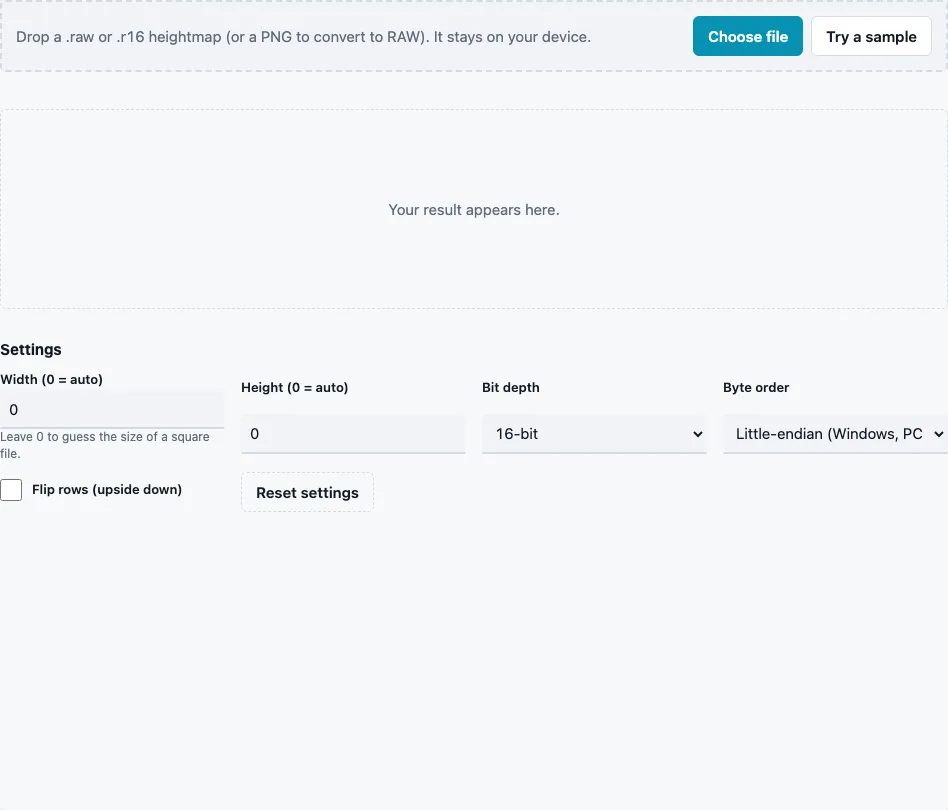
How to convert a RAW heightmap to PNG
- Drop a .raw or .r16 file on the tool or press Choose file. Try a sample loads a 257 × 257 16-bit terrain.
- Leave Width (0 = auto) and Height (0 = auto) at 0 for square files; the size is guessed from the byte count. For non-square files enter the size (up to 16384).
- Set Bit depth to 16-bit (default) or 8-bit.
- For 16-bit files, set Byte order: Little-endian (Windows, PC) (default) or Big-endian (Mac).
- Tick Flip rows (upside down) if north and south are swapped.
- Check the stats line (Size, Bytes, Size guessed, Direction, min, max and mean) and the 3D preview.
- Press Download Height map to save the 16-bit PNG.
To go the other way, drop a PNG, TGA, EXR or other image instead. Its grey values are written as RAW (16-bit) in the byte order you chose, and a 16-bit PNG copy is offered as well. Keep the image at the size your terrain needs, for example 513 × 513, because RAW files carry no size information of their own; it is never scaled.
A quick way to find the right settings for an unknown file: look at the 3D preview after each change. Smooth hills mean the settings match; static means the byte order is wrong; slanted stripes mean the width is wrong. The Bytes value in the stats is the file size, which must be at least width × height × 2 for a 16-bit file, or the tool reports that the file is too small for the size you entered.
Why does my RAW heightmap look like noise?
A RAW file is only a list of numbers, so every setting has to match the way it was written. Wrong byte order is the most common cause of noise: each 16-bit height is read with its two bytes swapped, which turns a smooth slope into static. A wrong width makes the rows slide into each other and shows up as diagonal stripes; a wrong bit depth garbles the whole picture.
| What you see | Likely cause | Fix |
|---|---|---|
| fine static, no shapes | byte order swapped | switch Byte order |
| diagonal stripes or slanted copies | wrong width | enter the correct Width |
| garbled pattern, often striped | wrong bit depth | switch Bit depth |
| landscape upside down | rows stored bottom first | tick Flip rows |
How is the size guessed?
For a file with no size entered, the tool looks for an exact square at the chosen bit depth. If there is none but the file is an exact square at the other depth, it reads it at that depth and the stats say so under Read as; a byte count is never a square at both. If neither fits, it asks you for the size instead of guessing. Some byte counts:
| Bytes | Guessed as |
|---|---|
| 132,098 | 257 × 257, 16-bit |
| 526,338 | 513 × 513, 16-bit |
| 263,169 | 513 × 513, 8-bit (switched from 16-bit) |
| 262,144 | 512 × 512, 8-bit (switched from 16-bit) |
| 524,288 | 512 × 512, 16-bit |
The 524,288 bytes line shows the limit of guessing: that file could just as well be a 1024 × 256 16-bit file or a 1024 × 512 8-bit file, so whenever you know the real size, enter it.
What is the difference between little-endian and big-endian?
A 16-bit height takes two bytes. Little-endian stores the low byte first, big-endian the high byte first. Windows PCs use little-endian, and some terrain tools label the two options “Windows” and “Mac”. Unity’s heightmap import, for example, has a Byte Order setting for 16-bit files.
What is inside a 16-bit RAW file?
Nothing but heights: width × height values of 2 bytes each, row after row, with no header, no size and no colour information. A height of 0 is the lowest point and 65,535 the highest. The PNG written here stores the same numbers, which is why the conversion is lossless in both directions for 16-bit data. File extensions vary between programs, usually .raw or .r16; the content is what counts.
Questions and answers
How do I convert a RAW heightmap to PNG?
Drop the file, check that the preview shows a smooth landscape, and download the 16-bit PNG. Adjust byte order or size if it does not.
Why is my heightmap upside down?
Some programs write the bottom row first. Tick Flip rows; Unity’s RAW import has a similar Flip Vertically option.
Can I convert a PNG back to RAW?
Yes. Drop the PNG and download RAW (16-bit). Colour images are turned into grey first.
What does “Size guessed” mean in the stats?
“yes” means the width and height were worked out from the file size; “no” means you entered them.
Does the PNG keep all 16 bits?
Yes. A 16-bit RAW becomes a 16-bit PNG with the same 65,536 levels; an 8-bit RAW is stored in 16-bit with its 256 levels spread over the range.
What about 32-bit float RAW files?
They are not supported; save them as 16-bit in the program that made them.
Why does it say the file is smaller than width × height?
The width, height and bit depth you set need more bytes than the file has. Check the numbers, or set both sizes to 0 for a square file.
Can I open the RAW file from the Terrain Heightmap Generator?
Yes. It is 16-bit, little-endian and square, so the defaults here read it without changes.
Related tools
- Terrain Heightmap Generator: new terrains as 16-bit PNG and RAW.
- Height Map Generator: height from a photo, then save it as RAW here.
- Height Map to Normal Map: a normal map from the converted PNG.
- Displacement Map Generator: set a midpoint for displacement.
- Normal Map to Height Map: heights from a normal map.
- Power of Two Texture Resizer: resize the PNG before converting back.